
IMS Suite
IMS Suite is Computech's platform for integrated management systems and compliance. It connects the requirements of standards and regulations with the documents, risks, audits, corrective actions, training and management reporting that respond to them. Instead of separate spreadsheets, folders and e-mail threads for each standard, the organisation works from one governed environment where responsibilities, evidence and progress are visible.
The problem IMS Suite addresses
Organisations rarely work with a single standard. A company may hold a quality certificate, prepare for an information security standard, respond to data protection obligations and face new cybersecurity or resilience regulations. Each brings requirements that overlap, but in practice they are often managed separately. The result is duplicated documents, risks recorded in several places, audit findings that are hard to follow up and management reviews prepared by hand from scattered sources.
IMS Suite is built around a simple idea: a requirement, the control that meets it, the document that describes it, the risk it addresses and the evidence that shows it works should be connected. When they are, the organisation can see where it stands and what needs attention.
How the platform is structured
The platform is organised in layers that build on each other:
- Governed foundation: organisations, users, roles, permissions and a trail of privileged actions.
- Compliance model: the catalogue of standards and frameworks, their requirements and the unified controls that can serve several standards at once.
- Operations: day-to-day work on documents, risks, audits, corrective actions, training, suppliers and objectives.
- Intelligence: AI-assisted features and indicators that help people prepare, analyse and prioritise.
- Visibility: dashboards and reports for process owners and management.
At the centre is a knowledge graph that links requirements, controls, documents, risks, audits, actions and evidence, so that a change in one place can be traced to everything it affects.
Standards and frameworks
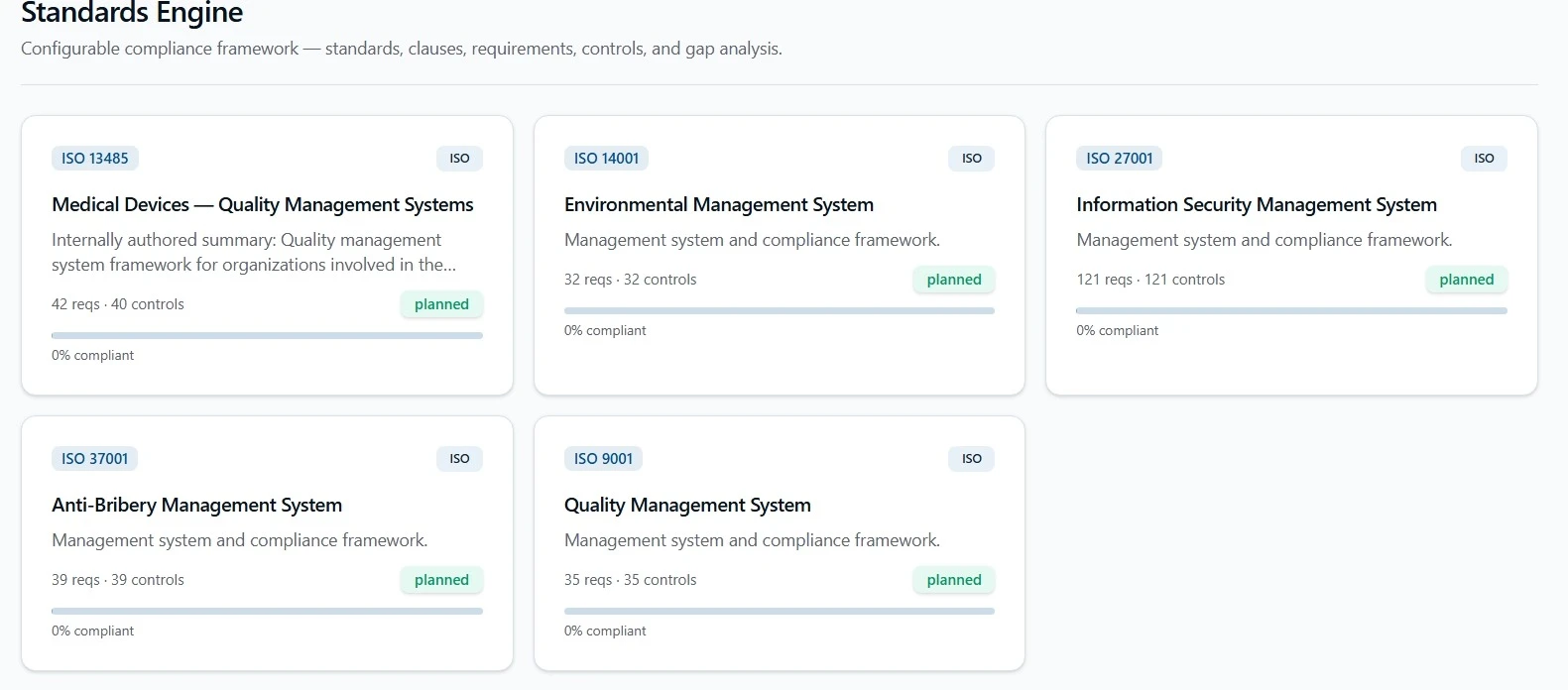
The catalogue includes 43 standards and frameworks, grouped in families:
- ISO: management system standards for quality, information security, environment, health and safety and other areas.
- European Union: GDPR, NIS2, DORA, the EU AI Act, the Cyber Resilience Act, CSRD and ESRS, and an ESG baseline.
- Cybersecurity and cloud: SOC 2, PCI DSS, NIST frameworks, CMMC, FedRAMP, CIS Controls, CCM and TISAX.
- Healthcare and life sciences: HIPAA, HITRUST, GxP and 21 CFR Part 11.
- IT governance and privacy: COBIT, ITIL, SOX and CCPA/CPRA.
The fullest coverage today is for ISO standards, GDPR, DORA and NIS2. The depth of content differs between frameworks, and we will tell you what is available for the standards that matter to you. Listing a standard does not mean that using the platform makes an organisation compliant or certified. Compliance depends on how the organisation works, and certification is decided by independent bodies.
What the platform helps you do
- Control documents: manage versions, reviews and approvals, so that people work from the current version and changes are recorded.
- Manage risks, findings and actions: record risks and audit findings, assign owners and deadlines and follow corrective actions to verified closure.
- Track competence and readiness: keep training records, see who is qualified for which tasks and follow readiness for certification.
- Give management a clear view: prepare objectives, indicators and management reviews from up-to-date information.
Modules
The platform includes modules for:
- Standards Engine and Unified Controls
- Knowledge Graph
- Document Control
- Risk Management
- Audit Management
- Corrective and preventive actions (CAPA)
- Training and Competence
- Certification Readiness
- Objectives and KPIs
- Management Review
- Supplier Management
- Executive Cockpit
AI-assisted features
IMS Suite includes AI features that support people in their compliance work:
- IMS Copilot: answers questions and helps prepare content within the context of your organisation.
- AI Gap Assessment: compares your current state with the requirements of a standard and highlights gaps.
- Risk Advisor: helps identify and describe risks and possible treatments.
- CAPA Advisor: supports root-cause analysis and the definition of corrective actions.
- Internal Auditor: helps prepare audits and organise findings.
Every AI request is checked against the user's organisation, role, permissions, subscription and available AI credits. AI suggestions are proposals: official records require human approval.
Governed agents
The platform also offers a governed fleet of agents for specific tasks, including a Compliance Officer, an Evidence Steward, Management Review Preparation, a CAPA Assistant and a Document Control Assistant. These agents are not autonomous. A user starts each task, each agent works with a closed set of tools, its actions are logged, material changes require approval and an administrator can suspend any agent.
Indicators and foresight
Compliance Health
Compliance Health is a score from 0 to 100 that summarises the state of the management system. It combines readiness (25%), corrective actions (20%), audits (15%), evidence (15%), documents (15%) and training (10%), with daily snapshots that show the trend over time.
Predictive Compliance
Predictive Compliance projects how indicators could develop over 30, 90, 180 and 365 days, based on current trends. These projections are signals to support planning, not probabilities or guarantees.
Executive Intelligence and What-If
Executive indicators give management a concise overview across standards and sites. The What-If Digital Twin lets users explore scenarios with simulated values; it never changes real records.
Security and access
- Multi-tenant SaaS with isolation between organisations
- Row-level security and role-based access control
- Server-side authorisation for every request
- Private storage for documents and evidence
- A trail of privileged actions
- User provisioning through SCIM 2.0
- REST API with OpenAPI documentation and scoped API keys
- Interface in Greek and English
Webhooks are available but require configuration for each case.
It is important to be clear about what the platform is not. IMS Suite does not hold its own SOC 2 or ISO 27001 certification. Its internal electronic approvals are not qualified electronic signatures under eIDAS; where a qualified signature is legally required, a separate signing solution is needed (see Digital signatures).
Who uses IMS Suite
Different people use the platform in different ways:
- Quality and compliance managers maintain the management system, follow requirements and coordinate audits and reviews.
- Process owners keep their documents, risks and actions up to date and respond to findings.
- Internal auditors plan audits, record findings and verify the effectiveness of actions.
- Employees read current documents, confirm training and report issues.
- Management reviews indicators, takes decisions and allocates resources.
- Administrators manage users, roles, integrations and settings.
Roles and permissions ensure that each person sees and changes only what their responsibilities require.
Moving from spreadsheets and folders
Most organisations come to IMS Suite with existing documents, risk registers and action lists. These do not need to be recreated from scratch. During implementation, we review what you already have, decide what should be brought into the platform and in what structure, and clean up duplicates and outdated items along the way. Starting with the most active areas, such as open actions and current documents, gives people a reason to use the platform from the first day.
What remains your responsibility
The platform organises and connects information, but the organisation remains responsible for its management system: defining policies and objectives, carrying out processes, keeping records accurate, deciding on risks and actions and demonstrating compliance to auditors and authorities. AI features and indicators support these responsibilities; they do not take them over.
Editions
- Starter: document control, risks, corrective actions and the AI Copilot.
- Professional: everything in Starter, plus audits, training, supplier management, AI Gap Assessment and calibration.
- Enterprise: a configuration agreed for larger or more complex organisations.
Pricing is provided through a quotation. AI usage is measured in credits.
How implementation works
1. Discussion
We discuss your organisation, the standards you work with, your current tools and your priorities.
2. Scope and proposal
We agree which standards, modules, users and sites are included, and prepare a proposal.
3. Configuration, migration and training
We configure the platform, bring in existing documents, risks and actions where needed and train administrators and users.
4. Pilot and expansion
We start with a defined area or standard, review the results with you and expand gradually to the rest of the organisation.
Illustrative scenarios
These examples are illustrative and do not describe specific clients.
- Several standards, one system: an organisation with a quality certificate prepares for an information security standard and uses unified controls to avoid duplicating documents and audits.
- Regulatory readiness: a company subject to NIS2 maps its obligations, records related risks and actions and tracks progress for management.
- Following up findings: an organisation that struggled to close audit findings assigns owners and deadlines in the platform and reviews progress at each management review.
What we need from you to start
- The standards and regulations you work with or plan to adopt
- Your current documents, risk registers and action lists
- The number of users, roles and sites
- A person who will own the platform internally
- Your priorities and any deadlines, such as an upcoming audit or regulatory date
What you receive
- A configured platform for the agreed standards, modules and users
- Existing information brought in and organised where agreed
- Trained administrators and users
- A pilot review and a plan for expansion
Next step
Tell us which standards you manage and how you work today. We will show you how IMS Suite could support your management system and propose a path that starts small and grows with you.
43 standards and frameworks. One connected model.
Start with the frameworks you need and reuse shared controls wherever requirements align.
ISO Management Systems (17)
- ISO 9001
- ISO 14001
- ISO 27001
- ISO 45001
- ISO 13485
- ISO 22301
- ISO 22000
- ISO 20000-1
- ISO 27017
- ISO 27018
- ISO 27701
- ISO 31000
- ISO 37001
- ISO 37301
- ISO 42001
- ISO 50001
- ISO 55001
EU Regulation & Sustainability (8)
- GDPR
- NIS2
- DORA
- EU AI Act
- CRA
- CSRD
- ESRS
- ESG Baseline
Cybersecurity & Cloud Assurance (10)
- SOC 2
- PCI DSS
- NIST CSF
- NIST 800-53
- NIST 800-171
- CMMC 2.0
- FedRAMP
- CIS Controls
- CCM
- TISAX
Healthcare & Life Sciences (4)
- HIPAA
- HITRUST CSF
- GxP
- FDA 21 CFR Part 11
IT Governance, Finance & Privacy (4)
- COBIT
- ITIL
- SOX
- CCPA/CPRA
Support depth varies by framework. ISO management system standards, GDPR, DORA and NIS2 currently have the fullest coverage. Licensing, content and configuration are agreed in the quotation and implementation. Listing does not imply automatic compliance, official approval or certification.
From a requirement to work carried through.
Standards Engine
Frameworks are structured into clauses and requirements, with policy, procedure and audit content. Content is loaded and reviewed during implementation. New editions can be compared before adoption; this is not automatic regulatory monitoring.
See this workflow in a demoUnified Controls & Cross-Framework Mapping
Connect shared requirements across frameworks to one control, owner and evidence set. Review overlap before adding a framework and reduce duplicate documentation where requirements genuinely align.
See this workflow in a demoKnowledge Graph & Requirements / Evidence
Trace actual relationships from a clause to its control, document and evidence. Identify coverage and gaps by licensed framework. The graph follows recorded links; it does not invent evidence or infer compliance.
See this workflow in a demoDocument Control, Versions & Approvals
Manage draft, review, approval, signature and publication while retaining previous versions. Import Word, PDF and XML using the agreed numbering. AI drafts follow the same approvals. Internal signatures are not qualified eIDAS trust-provider signatures, and retention records do not imply automatic deletion.
See this workflow in a demoRisk Management
Record likelihood, impact, inherent and residual risk, ownership and review dates. Link risks to clauses, processes and departments so treatment actions have context. AI Risk Advisor proposes; your team assesses. Opportunities use a category in the same register, not a separate workflow or heat-map tool.
See this workflow in a demoAudit Management
Plan audit programmes, cycles and teams, record findings against criteria and evidence, and connect them to CAPA and management review. Evaluate offline field capture on your own devices during a pilot. AI Internal Auditor proposes findings for the auditor to accept or reject.
See this workflow in a demoCAPA Management
Connect issues, root causes, actions, owners, due dates and effectiveness evidence. Completion requires verification. Nonconformities are handled through CAPA and findings, not a separate NCR register. CAPA Advisor supports preparation; it does not independently close records.
See this workflow in a demoTraining & Competence
Define role requirements, competence levels, assignments, expiry dates and training evidence. The matrix highlights gaps for targeted training. Requirements are defined by the organisation, and reminders depend on configured notification workflows.
See this workflow in a demoCertification Readiness & Management
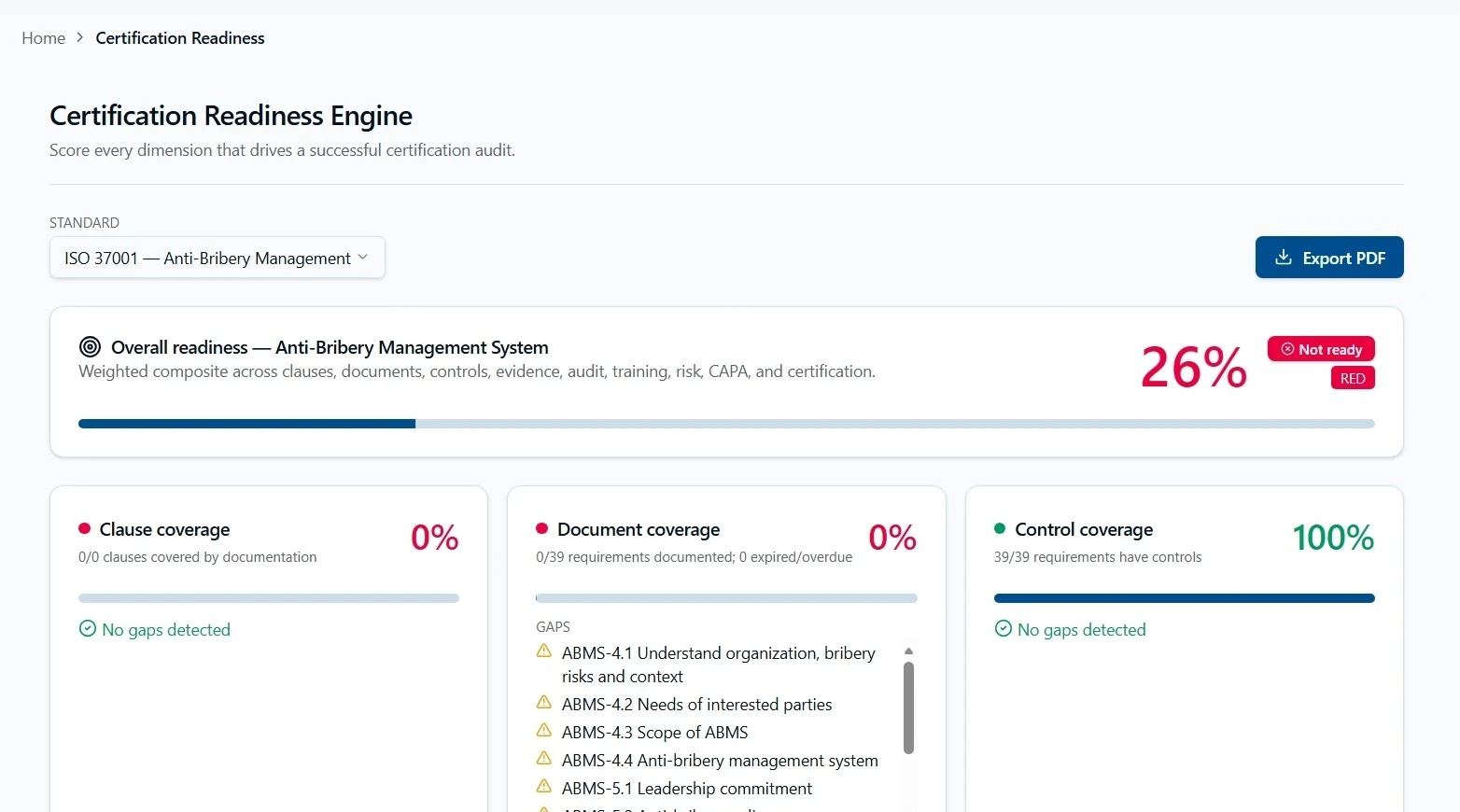
Review readiness and key gaps per licensed standard, export a summary and track certificate status. Certification-body workspaces require initial setup and scoped access. Dates are customer milestones; IMS does not guarantee a certification decision or timeline.
See this workflow in a demoObjectives & KPI Management
Set measurable objectives and record evaluations over time across quality, environment, safety, energy and other areas. Formulas, dependencies and data-quality checks connect reporting to its actual sources.
See this workflow in a demoManagement Review
Prepare an agenda, changes, exceptions and input coverage from system records. Some inputs remain manual and are identified. Optional AI summaries stay drafts until approved, helping management focus on assessment and decisions.
See this workflow in a demoSupplier Management
Organise supplier information and oversight within the agreed scope. The quality of records maintained by the organisation affects Supplier Trust. Tracking does not replace professional due diligence or risk assessment.
See this workflow in a demoExecutive Cockpit, Reporting & Analytics
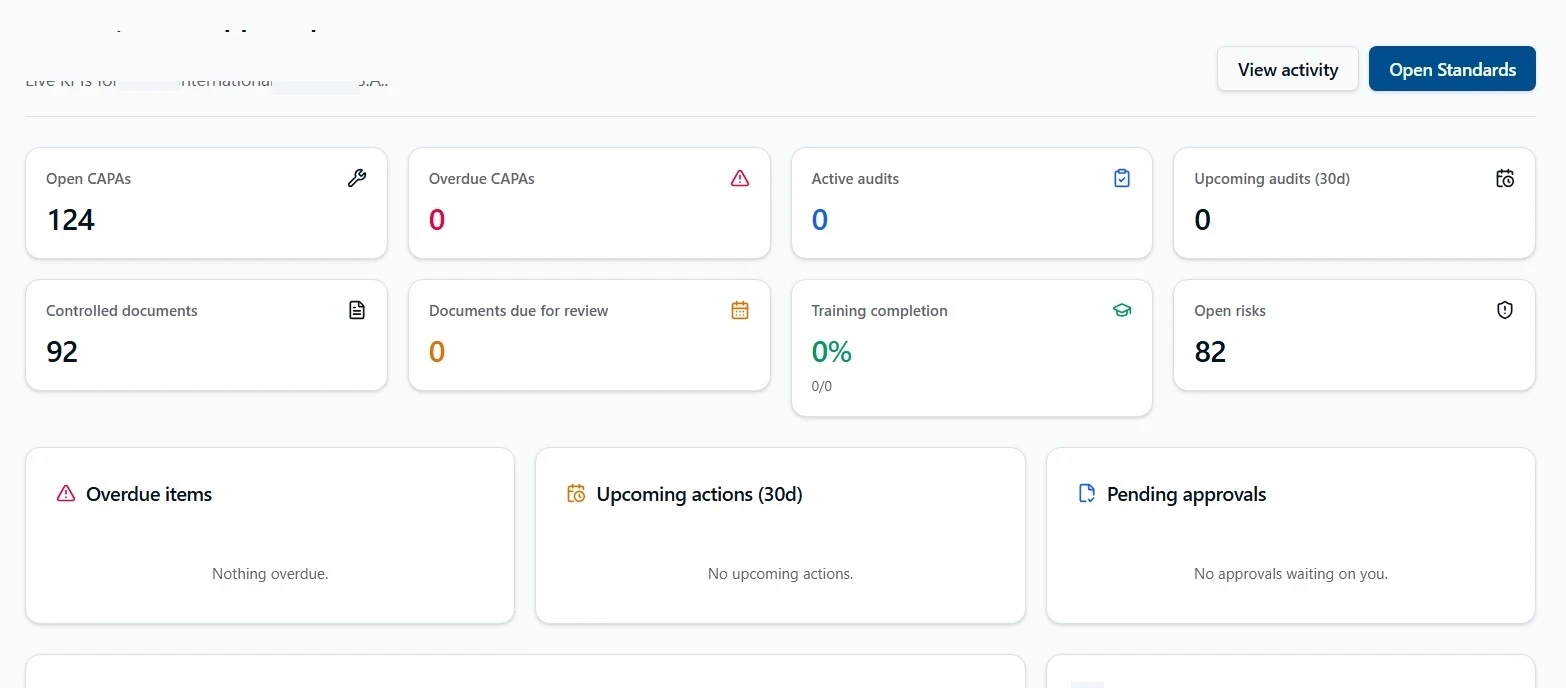
Bring compliance health, CAPA, audits, certificates, KPIs and risks together, with Word, PDF, Excel, CSV or PowerPoint exports. Screens refresh when opened or reloaded; some summaries are calculated overnight, not as a live stream.
See this workflow in a demoExplore the actual interface.
Assessment and the certification decision remain with the competent independent body.
Frequently asked questions
Can I manage more than one standard?
IMS Suite brings multiple standards and frameworks into the same environment. Shared requirements can use common controls and evidence where applicable. Your selected frameworks form part of the agreed scope.
Can we use our existing documents?
IMS supports importing existing Word, PDF and XML documents. During implementation, we agree how to organise, migrate and review your content.
Who approves AI proposals?
Users with the appropriate permissions review and approve proposals that create official records. AI assistance operates within the organisation, role and subscription boundaries.
Does using IMS guarantee certification?
IMS supports documentation, action tracking and audit preparation. Certification assessment and decisions remain with the relevant certification body.
How do we choose an edition and price?
We start with the standards, organisations, users and capabilities you need. The formal quotation sets out the final commercial scope, AI usage and pricing.
See IMS in the workflows that matter to you
Tell us which standards you work with and which activities you want to organise. We will discuss the appropriate scope and demonstrate the relevant platform workflows.